Speed is the feature that matters
I have lost more ideas to slow synths than to bad ones. You hear something in your head, you open a plugin, and by the time you have dug through three menus to make it move, the idea has gone cold. So the thing I cared about most while building Laura was the distance between sitting down and playing something real.
This is the workflow I actually use. It gets you from a blank patch to something playable in a couple of minutes, and none of it is a trick you have to learn. It is just the fast path across the front page.
Start by rolling the dice
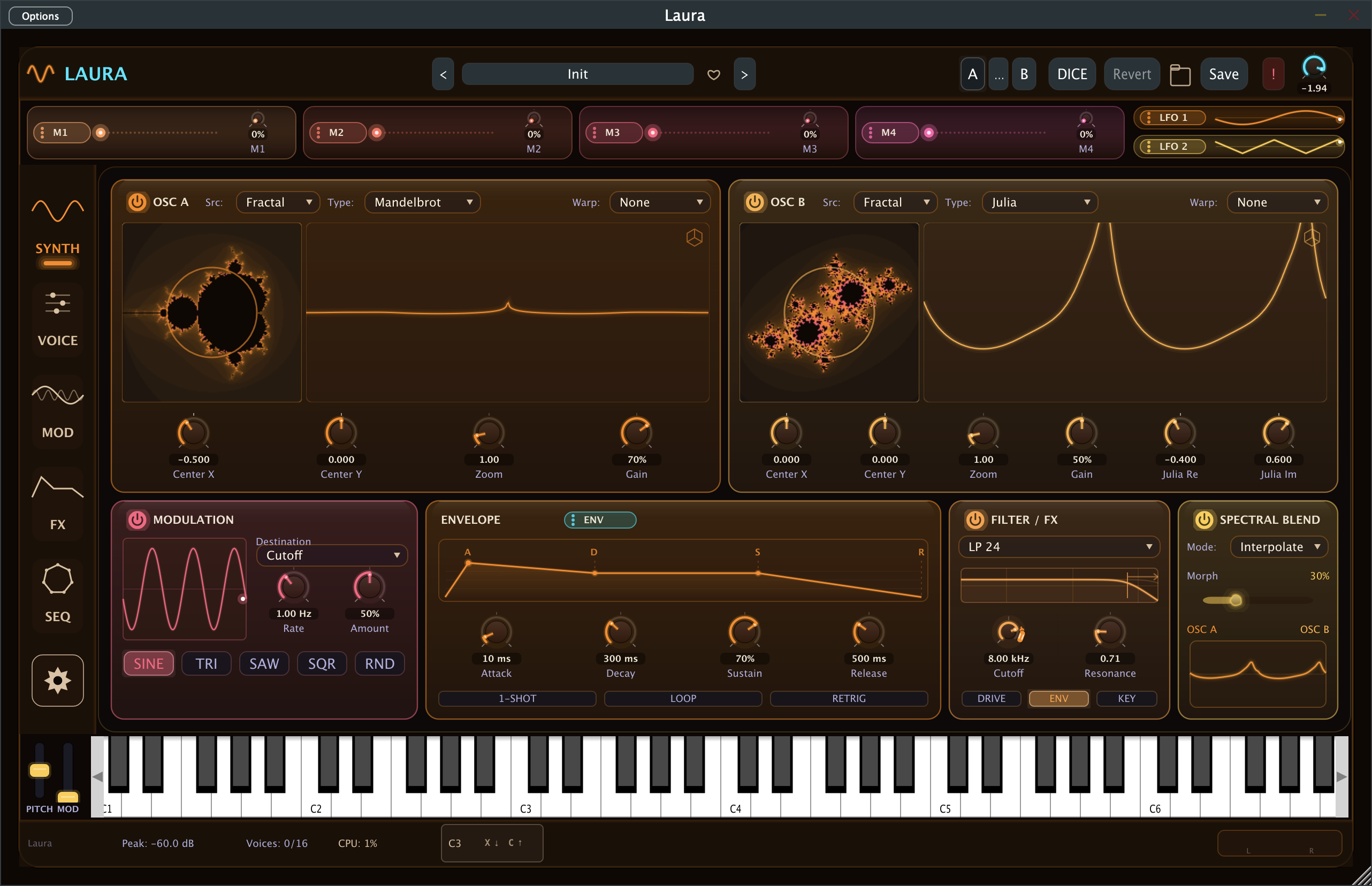
The fastest cold start in Laura is the DICE button, up in the header. One click rolls a whole patch: both oscillator engines, the fractal or wavetable they land on, the filter, the envelopes, the LFOs, the modulation routings, and an FX rack chosen to fit the sound. It even sets a sensible master volume, so a roll never blows your ears out.
It is not pure random. I taught the roller which combinations tend to sound musical, so a fractal lead is far more likely to land on a reverb and a chorus than on a bit crusher. Roll a few times and the results feel programmed, even though they are not.
The way I use it: roll until something catches my ear, then keep almost everything the roll picked and change two or three knobs. The roll is the starting point. You finish it. About one in ten rolls is something I save. If nothing is landing, load any preset in a category you like first, then roll. The dice lean toward the category of the current patch, so rolling from a bass preset gives you bass.
Or start close and bend it
When I already know roughly what I want, I skip the dice and open the preset browser instead. Click the preset name in the header and it fills the window: a category sidebar down the left, a search box, and a row of tag chips like acid, lush, gritty, and warm. Chips with no matches grey out and slide aside, so the useful ones are always in reach.
Find something in the neighbourhood of your target, load it, and start changing things. Bending a preset that is already close is almost always faster than building from silence, and you learn the synth quicker by taking working patches apart than by staring at an init patch.
Add movement by dragging
A static patch is where you start. What makes it feel alive is motion, and motion in Laura is a drag.
Grab a source, an LFO, an envelope, a macro, or a sequencer output, and drop it straight onto the knob you want it to move. The routing appears in the matrix, ready to play, and it takes the colour of its source, so one look across the panel tells you what is driving what. No menu diving, no picking a slot, no typing in a destination. See a knob that should breathe, drag an LFO onto it, and it breathes.
Finish it with one knob
By the last stretch of a patch you are chasing feel rather than structure, and that is what the macros are for. A macro is a single knob that can move many things at once.
My go-to is an intensity macro. Route one macro to the filter cutoff, to resonance, to reverb mix, and to a touch of oscillator detune, all at the same time. Now a single knob takes the patch from gentle to aggressive across every one of those together. Give it an exponential curve and the bottom half stays subtle while the top half opens right up. Right click the macro to learn a hardware knob onto it, and you can ride that one control while you play instead of freezing the sound in place.
Chase the tone by ear
Some of the fastest moves in Laura are the ones you make by hand instead of by number. On a fractal oscillator the canvas is live: drag the reading point across the set and the timbre shifts under your fingers, so you hunt for a tone by ear rather than dialing in coordinates.
On the Spectral Blend card, one Morph slider crossfades or fuses your two oscillators. That single control is often all a patch needs to go from flat to interesting, and it costs you one drag to find out.
Don't get lost
Working fast means making a mess, and the two controls that keep the mess safe are A and B in the header. Snapshot the patch on A, tweak your way into B, and flip between them to hear whether you actually improved it or just changed it. If a session wanders somewhere you don't like, Revert drops you back to the saved version in one click.
That safety net is the whole point. It lets you try the bolder move without second-guessing every turn, because you can always flip back to where you were.
Try it
None of this is something you study. It is four habits that live on the front page: roll, drag, one macro, compare. The first time you build a patch this way it takes a few minutes. The tenth time it takes less than one.
The demo is free and fully featured for thirty minutes a session, with no account needed. Open Laura, hit DICE, drag an LFO onto a knob, and see how far you get before the coffee is cold.
Keep reading
- Where Laura fits next to Serum, Vital and Pigments · A comparison written by an interested party. The useful test is not whether I say nice things about my own synth, it is whether I say accurate things about everyone else's.
- Why your tempo synced LFO is in the wrong place · Set an LFO to one bar, print the loop, and it sounds right. Stop the transport, hit play again, and the same bar sounds different. The rate was never wrong. The position was.
- How to program a tape stop instead of drawing one · Every glitch fill you have printed was drawn by hand, once, for one drop, at one tempo. The alternative is to write time as a pattern and let the fill happen on the bar, every bar, without you being there.
Hear it for yourself. The demo is free and unrestricted for 30 minutes per session.